Matrix
Matrix is an open protocol allowing for end-to-end encryption, federation, and open freedom for communication. So you know I had to have one of my own. You'll find it at https://matrix.hylianux.com
You might be a little bit confused as to how to do everything, so I've made a quick-start guide for common things you may want to do.
Creating an account
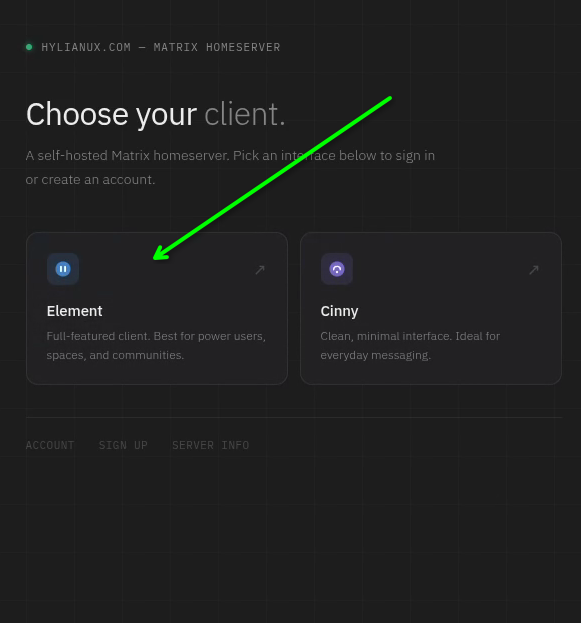
I tried to make this as simple and intuitive as possible. You can choose either element or cinny, but I recommend doing it via the element side.
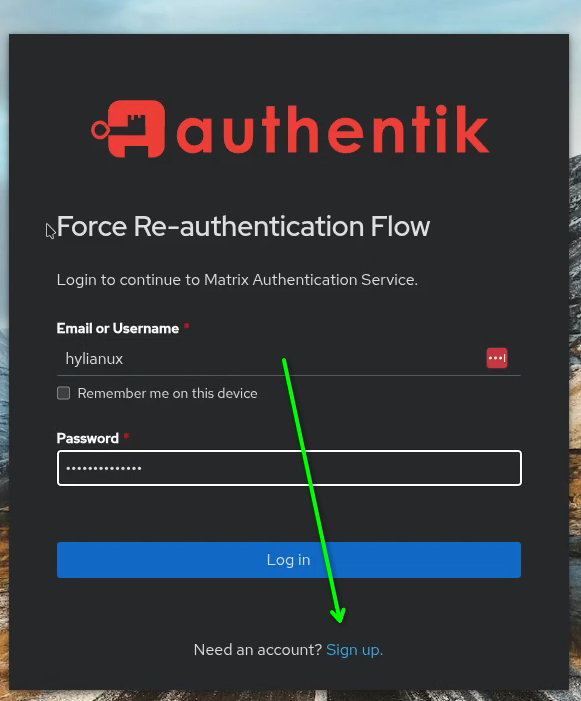
It pushes you right to the authentication server. Click sign up.
Once you type your information in, it'll submit you into my system for me to manually approve.
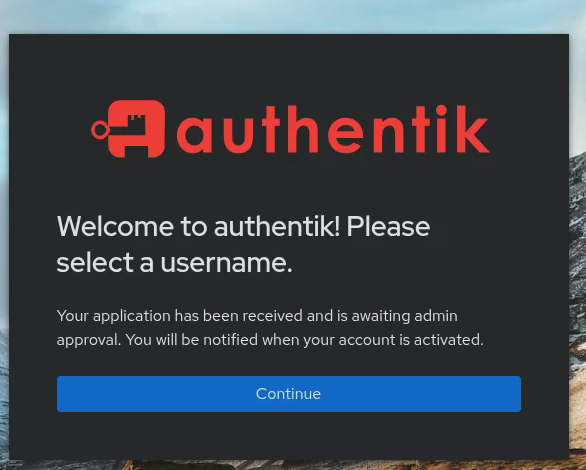
Once I approve you, you can log in and use Matrix.
Where's the party at? How do I get to Vulgar Realities?
I'll be honest, this part's not the best user experience, but we're gonna go through it.
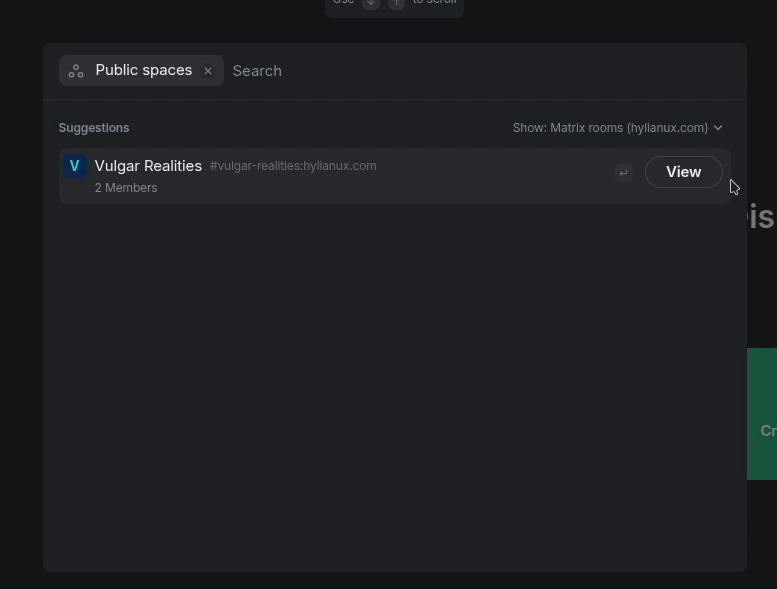
On your home screen, you'll see 3 green buttons. Ignore them entirely and click the plus sign on the left-side of the screen where the servers are, and click search for public spaces.
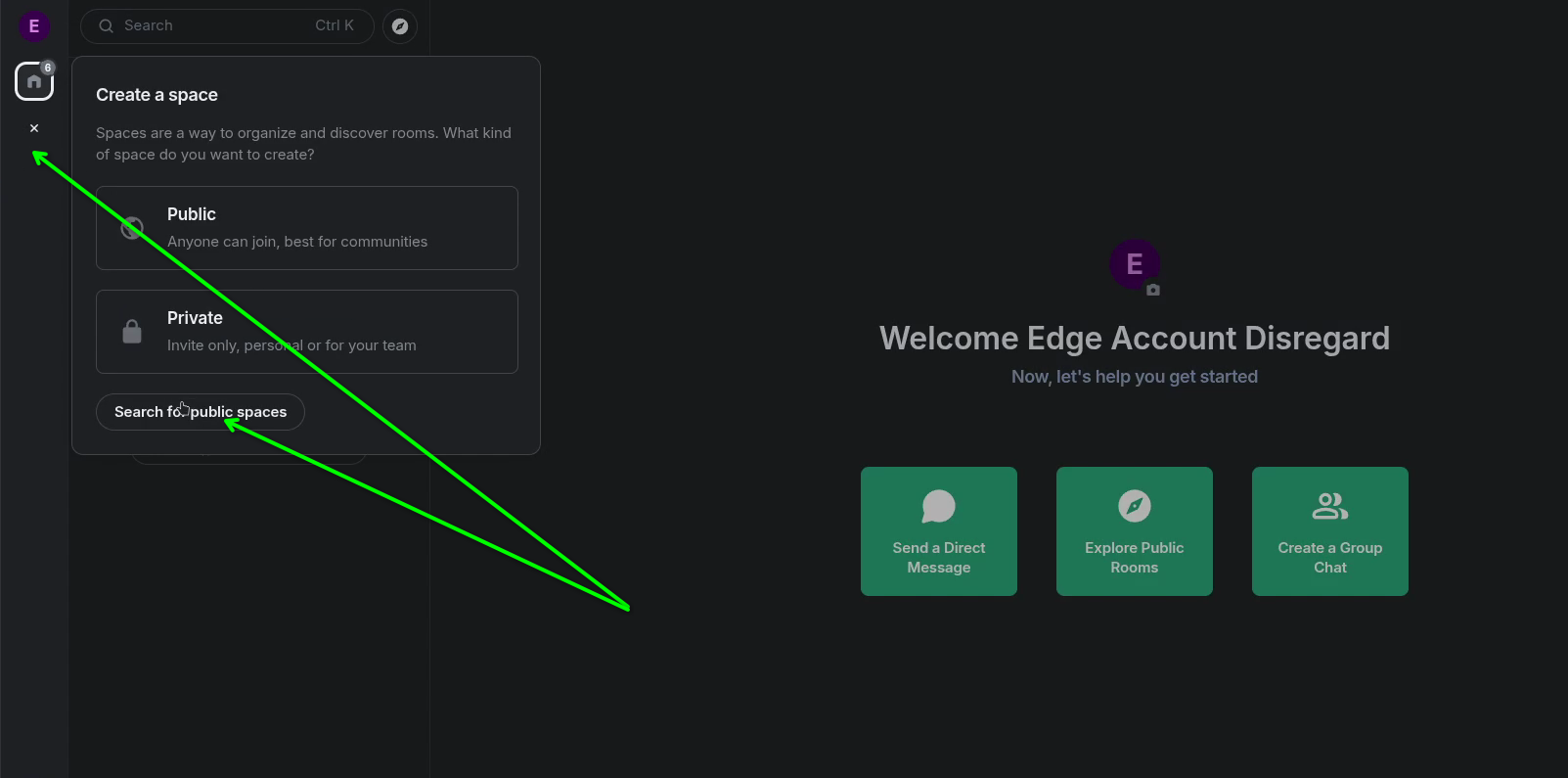
And there's Vulgar Realities.
Awww but where's all the good stuff in there? All I see is like "general".
Well of course. I keep shit locked down. Come find me and I'll pull you into the real inner sanctum.
Ok, what's this about "joining" a room? And once I've joined it, why do they all appear under my Vulgar Reality list?
Yup, bad user experience ahoy. Here's how you're "meant" to use it, and it'll make more sense if you follow this path: completely ignore the 2nd panel from the left. This panel is meant to show you all the rooms in the whole area. On the far-left panel, click "Vulgar Realities" (or the big blue V). You may have to click it twice, but once you do, it will show you all the chat rooms and inner spaces available. From here you can join a room, or even a whole "space" (Members Only, for example). Rooms and spaces in Matrix aren't like in Discord where everything is in drawers... they're more like "tags" that can be applied to multiple rooms. For example - I can make a room and apply it to 3 different spaces for different reasons... like memes.
It's all complicated, but all you need to understand is this simple message: click join on the rooms you wanna join. they'll all show up as one big-ass list in your 2nd-from-left panel. Click the whole space to see all the rooms. Savvy?
Where are the "room settings" at?
They bury them, I hate it. Bad UX. on both mobile and web/desktop element, you can click the "title" part of the room you're in (the bar in the middle at the top of the screen that displays the room's name), and a menu will slide out to the right where you can edit the room/space settings.
Dumb question: I thought matrix.hylianux.com was your server... why isn't Vulgar Realities just defaulted when I log in?
Ah, welcome to the world of self-hosted. Just because I'm hosting this myself doesn't mean your options are limited.
My server isn't a house - it's an undeveloped neighborhood with one street and one house in it already (Vulgar Realities). You can make your own houses and streets and build out this neighborhood.
Compared to Discord - Discord is the neighborhood. You either join a server, or make one yourself. But Discord controls it all. In Matrix - it's like having multiple instances of Discord, each with their own sets of servers. My server and their servers "federate" to each other, allowing cross-talk between them. Our communities each decide who we want in, and who we want out.
So, with that in mind, "Vulgar Realities" is a "space" within my Matrix server, just like it's a "server" inside Discord's overarching server. Just because you join Discord doesn't mean it'll default to Vulgar Realities, and Matrix is no different.
Enable Encryption Yo!
We'll be able to see what you write, but you won't be able to see what we write, unless you enable encryption in encrypted rooms. This is what Matrix was made for.
Click your username at the top-left of the screen, and go to all settings (not to be confused with the settings icon at the bottom-left of the screen. ugh.)
There'll be a red dot next to encryption, so click it, and "set up recovery". Follow the directions, and ‼️‼️‼️‼️SAVE THAT RECOVERY KEY OH MY GOD SAVE IT‼️‼️‼️‼️. If you don't save that key, you lose all chat history. Do not fuck around with this, save it someplace super safe.
Set up TOTP Authentication
Other names for this are 2fa (2-factor authentication, which is technically wrong), Multi-factor authentication (also technically wrong), and 2-step authentication (accurate).
Anyway, go to https://id.hylianux.com.
Log in with your credentials, assuming it doesn't just log you right in anyway.
At the top-right, you'll see a gear icon. Click it, and go to MFA Devices.
Click "Enroll >> TOTP Device" and that will grant you the ability to scan a qr code so you can log in with your authenticator app of choice.
How else can I connect to this? Any other apps?
Of course. You're likely connected via https://element.hylianux.com right?
FYI: the version of element I host is modified a little bit compared to the official version
This is a client called "element" and it's also got a desktop and mobile variant here: https://element.io/en/download.
As for you android kings, be sure to also check out this other Matrix client if you're dissatisfied with element X:
https://f-droid.org/en/packages/chat.schildi.android/
Other apps you can use to connect to Matrix
Element Desktop
When you first boot it up, click sign in, and it'll ask you what server you wanna connect to. By default, matrix.org is selected. Click edit, and type in "matrix.hylianux.com". Then connect as normal.
Cinny
This is a discord-like experience that runs in your browser only. https://cinny.hylianux.com
Element X and Schildi Chat Next
When it first boots up, it'll assume you want to connect to matrix.org. We don't want it to do that.
Choose "sign in manually". It'll say "hey you're about to sign into matrix.org" at the beginning. Do not click continue. Click 'change account provider'. Then click other, and type "matrix.hylianux.com". Select my server. NOW you can click continue.
Confirm your digital identity
Hey, this step's important, it'll happen no matter what thing you use. You have 2 options
- Remember that big ol' recovery key I told you to hold on to tightly? You can copypaste that in there if you wanna.
- Use another device <- This one's easier.
Choose use another device, and leave the app open here on your pc, whether it be through the website, or the desktop app. Click start verification. You'll get a popup on your other devices to "start verification". Click continue on both your phone and the pc, and verify the emojis are the same on both, keep clicking continue on both. Congratulations - you're in.
This also happens if you try to connect from another PC - you can use element or schildi next to verify you so you can log in on that other machine.
Technically there are 2 other android clients you could use, but they don't work with my server. They might work with older ones though.
So why would I use this over Discord?
This is perhaps the most important question to ask. Discord reads everything you write (even in DMs) and sells it to advertisers and more. You don't have privacy there.
Worse yet - they're beginning to implement ID verifications where they'll need pictures of your driver's license and some kind of photo verification of you personally.
"No big deal, I have nothing to hide." Yes you do - anyone who gets that information can create credit cards in your name. This is a huge fast-forward path for identity theft.
"Oh but surely they keep that information secure, right?" NO! There are data breaches ALL THE TIME that spill everyone's personal information out to the internet. Bad actors take it and masquerade as you while they do terrible things, or steal your money, or impose credit on you. Other companies watch what you're talking about and see if they can advertise a product to you that you might like. For example - if you're a depressed or traumatized 14-year-old girl, they might advertise beauty products and weight loss drugs to "make you prettier" because they know people with low self-esteem tend to buy stuff like this in the hopes that it'll make them happy. It's malevolent at worst, and rude/judgmental at best, and I'll have no part of it.
But Discord is so much easier...
Well then go use Cinny. It's a Matrix client designed to look almost exactly like Discord, and lucky for you I happen to host it right here. You're welcome.
Yeah but how am I supposed to use this while all my friends are still on Discord?
I have a solution to that problem too.
Use my self-hosted Discord Bridge
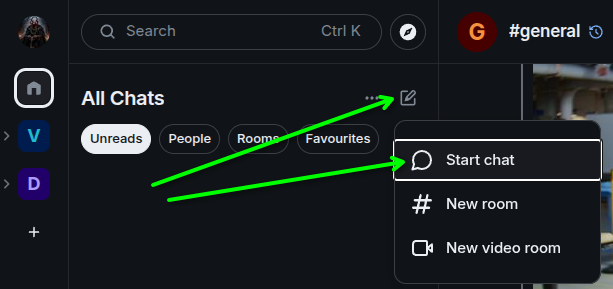
On the left side of the screen in element, click the "home" icon, then click the little pen-to-paper icon and select "start chat".
In the search box, type @discordbot:hylianux.com and click Go.
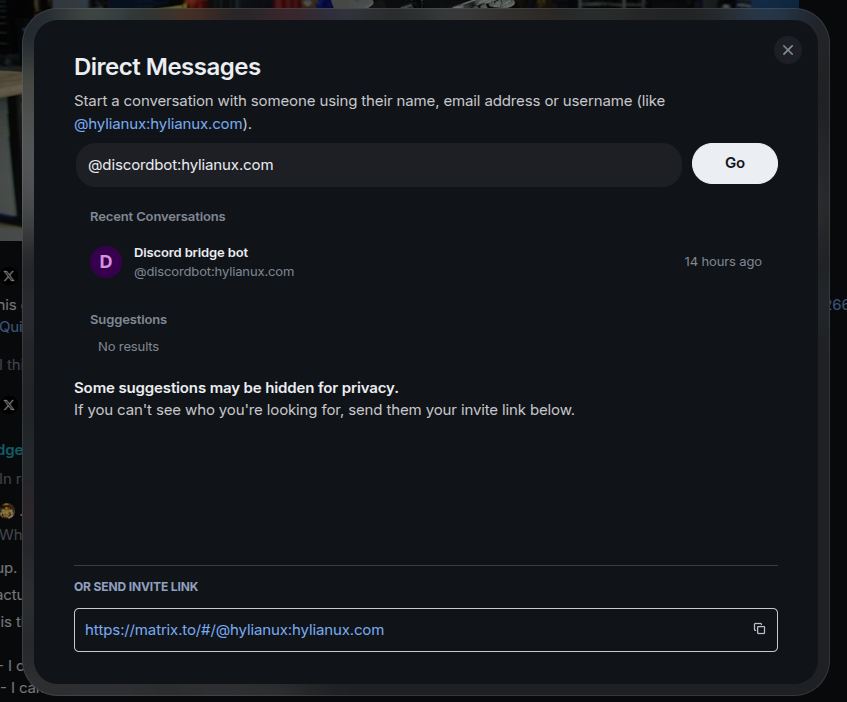
Create a new room with this bot (you may have to type a message like "hi") and it'll greet you with some basic instructions.
Enter login-qr and use your phone to log into Discord via the qr code.
The first thing it should do is generate a space for you with all your recent DM's. You'll have to click "accept" on them all, because this is how Matrix works.
Now you'll want to bring over the discord servers you'll actually talk on.
Enter guilds status and it'll give you a list of servers you're in, and assign them some long-ass string of numbers to identify them.
... And I'm going to warn you right now, this is the part where things get tricky, and stupid, and bad user experience I know it sucks.
First - figure out what order you'd like to view your servers in now, because you'll be stuck with it once you start adding them.
Next - enter guilds bridge thatLongStringOfNumbersForTheServerYouWant
Keep that number handy now, because you're about to use it again.
Enter guilds bridging-mode thatLongStringOfNumbersForTheServerYouWant everything
Almost done. Now enter disconnect, followed immediately by reconnect. I know, this is asinine, but if you don't do it this way, it'll get lost trying to put chat rooms inside their respective "category/spaces" where they belong, and will be orphaned rooms that are super hard to find.
NOW you can start clicking accept to join the rooms you want to chat in. Me, I just joined all of them, and then muted the ones I don't care about, but you do whatever you wanna do.
So what appearance settings should I set?
Element Desktop/Web
The settings gear icon is at the bottom-left. Click it, and open "All Settings". Then click Preferences. These are the settings I like to have on, which I think create the best user experience:
Preferences
- Room list
- Show Message Previews - ON
- Spaces
- Show all rooms in Home - ON
- Presence
- Send read receipts - ON
- Send typing notifications - ON
- Composer
- Automatically replace plain text Emoji - OFF
- Enable Markdown - ON
- Enable Emoji suggestions while typing - ON
- Use Ctrl+Enter to send a message - OFF
- Surround selected text when typing special characters - OFF
- Show stickers button - ON
- Insert a trailing colon after user mentions at the start of a message - ON
- Code Blocks
- Enable automatic language detection for syntax highlighting - ON
- Expand code blocks by default - OFF
- Show line numbers in code blocks - ON
- Link Previews
- Enable previes - ON
- Enable previews in encrypted rooms - ON
- Images, GIFs and Videos
- Autoplay GIFs - ON
- Autoplay videos - OFF
- Timeline
- ... Turn all of them to ON
- Moderation and safety
- Show media in timeline - Always show
- Allow users to invite you to rooms - ON
- Room Directory
- Show NSFW content - OFF
Encryption
- In encrypted rooms, only send messages to verified users - OFF!
Labs
- Join all ... both video rooms and notification settings
How do I send animated gifs?
Ah... well, if you're using mobile, you can probably use whatever your mobile device prefers as far as gif-pickers go. If you're using element desktop or web, then this extra step below will enable it.
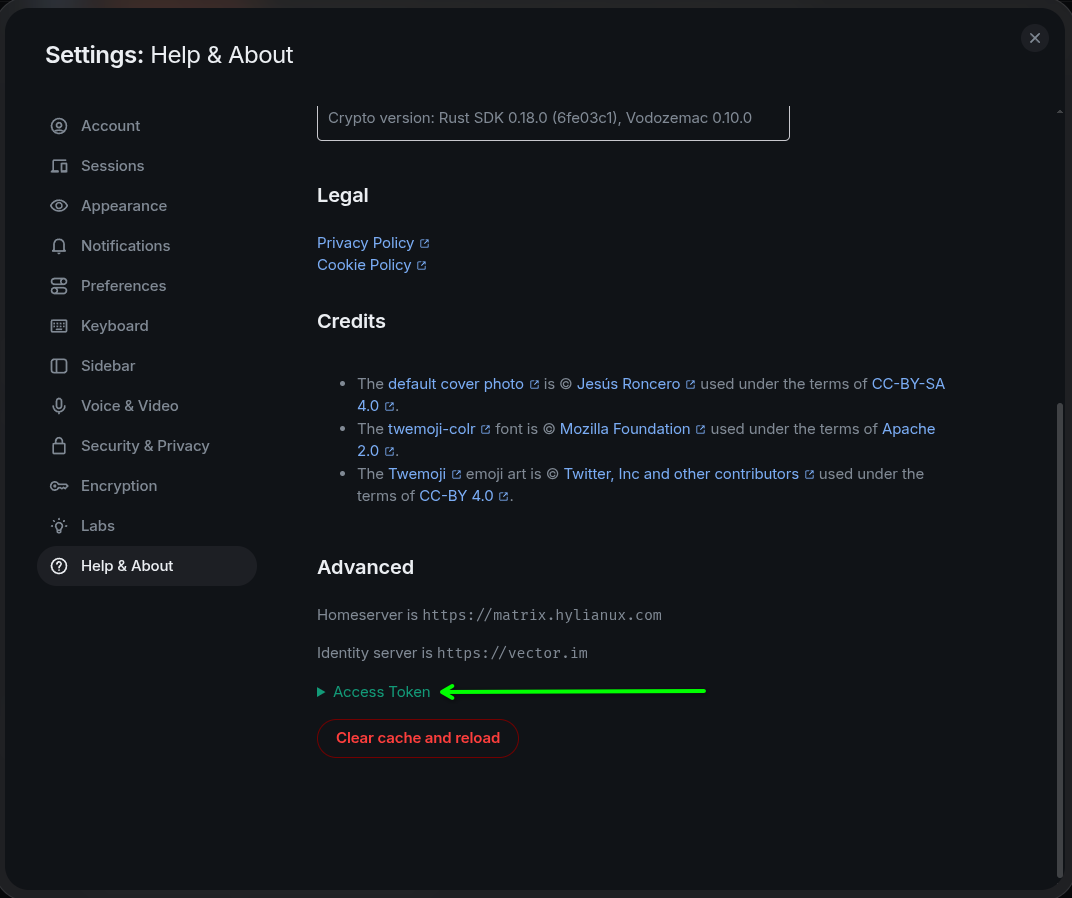
The easiest path is to just download one of these 2 scripts depending on what platform you're on, and follow along. It'll ask you for your username, and your "access token". You'll find that token in element desktop/web under all settings -> help and about.
For linux users, download this script. You can view it in its entirety below
Click to view the Linux script
#!/usr/bin/env bash
#
# set-gif-picker.sh
#
# Registers the GIF picker widget on a Matrix account by writing the
# `m.widgets` account data event via the client-server API.
#
# This is per-user account data stored on the homeserver, so it follows the
# user to every device and every Element instance they log into. It only needs
# to be run once per person.
#
# Usage:  ./set-gif-picker.sh
#         ./set-gif-picker.sh --remove     (unregisters the picker)

set -euo pipefail

# ---------------------------------------------------------------------------
# Site configuration -- edit these to match your deployment
# ---------------------------------------------------------------------------

HOMESERVER="https://matrix.hylianux.com"   # client-server API base URL
SERVER_NAME="hylianux.com"                 # the domain in your MXIDs
WIDGET_NAME="GIFs"                         # label shown in Element

# NOTE: single quotes are required. $theme is a literal placeholder that
# Element substitutes at load time -- it must NOT be expanded by the shell.
PICKER_URL='https://gifs.hylianux.com/?theme=$theme'

# ---------------------------------------------------------------------------

RED=$'\033[0;31m'; GREEN=$'\033[0;32m'; YELLOW=$'\033[0;33m'
BOLD=$'\033[1m'; DIM=$'\033[2m'; RESET=$'\033[0m'

info()  { printf '%s\n' "$*"; }
ok()    { printf '%s✓%s %s\n' "$GREEN" "$RESET" "$*"; }
warn()  { printf '%s!%s %s\n' "$YELLOW" "$RESET" "$*" >&2; }
die()   { printf '%s✗%s %s\n' "$RED" "$RESET" "$*" >&2; exit 1; }

command -v curl >/dev/null 2>&1 || die "curl is required but not installed."

REMOVE=false
[[ "${1:-}" == "--remove" ]] && REMOVE=true

# ---------------------------------------------------------------------------
# Gather credentials
# ---------------------------------------------------------------------------

cat <<BANNER

${BOLD}Matrix GIF picker setup${RESET}

This registers the GIF picker widget on your Matrix account.
You will need an access token.

${BOLD}Where to find your access token in Element:${RESET}

  Element Web / Desktop
    Settings -> Help & About -> Advanced -> Access Token
    (click "<click to reveal>", then copy it)

  Element mobile
    Settings -> Help & About -> Advanced -> Access Token

${YELLOW}Treat this token like a password.${RESET} It grants full access to your
account. Close this terminal when you are done, and never paste it into
a chat or an issue tracker.

BANNER

read -rp "Username (just the local part, e.g. 'alice'): " USERNAME
USERNAME="${USERNAME#@}"          # tolerate a leading @
USERNAME="${USERNAME%%:*}"        # tolerate a pasted full MXID
[[ -n "$USERNAME" ]] || die "No username entered."

read -rsp "Access token: " TOKEN
echo
[[ -n "$TOKEN" ]] || die "No token entered."

MXID="@${USERNAME}:${SERVER_NAME}"

# Percent-encode the MXID for use in the URL path.
MXID_ENC="${MXID//@/%40}"
MXID_ENC="${MXID_ENC//:/%3A}"

ENDPOINT="${HOMESERVER}/_matrix/client/v3/user/${MXID_ENC}/account_data/m.widgets"

# ---------------------------------------------------------------------------
# Verify the token actually belongs to this account
# ---------------------------------------------------------------------------

info ""
info "Verifying token against ${HOMESERVER} ..."

WHOAMI="$(curl -sS -H "Authorization: Bearer ${TOKEN}" \
  "${HOMESERVER}/_matrix/client/v3/account/whoami")" \
  || die "Could not reach the homeserver. Check HOMESERVER in this script."

case "$WHOAMI" in
  *M_UNKNOWN_TOKEN*)
    die "Homeserver rejected the token. It may be expired -- grab a fresh one from Element."
    ;;
  *'"user_id"'*)
    : # good
    ;;
  *)
    die "Unexpected response from whoami: ${WHOAMI}"
    ;;
esac

# Extract user_id without requiring jq.
ACTUAL_MXID="${WHOAMI##*\"user_id\":\"}"
ACTUAL_MXID="${ACTUAL_MXID%%\"*}"

if [[ "$ACTUAL_MXID" != "$MXID" ]]; then
  warn "Token belongs to ${ACTUAL_MXID}, but you entered ${MXID}."
  warn "A token can only write its own account data, so ${MXID} would fail."
  read -rp "Use ${ACTUAL_MXID} instead? [y/N] " REPLY
  [[ "$REPLY" =~ ^[Yy]$ ]] || die "Aborted. Re-run with the correct username."
  MXID="$ACTUAL_MXID"
  MXID_ENC="${MXID//@/%40}"
  MXID_ENC="${MXID_ENC//:/%3A}"
  ENDPOINT="${HOMESERVER}/_matrix/client/v3/user/${MXID_ENC}/account_data/m.widgets"
fi

ok "Authenticated as ${MXID}"

# ---------------------------------------------------------------------------
# Build the payload
# ---------------------------------------------------------------------------

if [[ "$REMOVE" == true ]]; then
  PAYLOAD='{}'
  ACTION="Removing"
else
  # printf keeps $theme inside PICKER_URL literal -- no heredoc expansion.
  PAYLOAD="$(printf '{"stickerpicker":{"content":{"type":"m.stickerpicker","url":"%s","name":"%s","creatorUserId":"%s","data":{}},"sender":"%s","state_key":"stickerpicker","type":"m.widget","id":"stickerpicker"}}' \
    "$PICKER_URL" "$WIDGET_NAME" "$MXID" "$MXID")"
  ACTION="Registering"
fi

info "${ACTION} the picker for ${MXID} ..."

RESPONSE="$(curl -sS -X PUT \
  -w $'\n%{http_code}' \
  -H "Authorization: Bearer ${TOKEN}" \
  -H "Content-Type: application/json" \
  -d "$PAYLOAD" \
  "$ENDPOINT")"

HTTP_CODE="${RESPONSE##*$'\n'}"
BODY="${RESPONSE%$'\n'*}"

if [[ "$HTTP_CODE" != "200" ]]; then
  info ""
  die "Homeserver returned HTTP ${HTTP_CODE}: ${BODY}"
fi

ok "Account data written."

# ---------------------------------------------------------------------------
# Read it back
# ---------------------------------------------------------------------------

VERIFY="$(curl -sS -H "Authorization: Bearer ${TOKEN}" "$ENDPOINT")"

if [[ "$REMOVE" == true ]]; then
  ok "Picker removed."
elif [[ "$VERIFY" == *"m.stickerpicker"* ]]; then
  ok "Verified: the widget is present on the account."
else
  warn "Write succeeded but read-back looks wrong:"
  info "  ${VERIFY}"
fi

cat <<DONE

${BOLD}Next step:${RESET} hard-reload Element (Ctrl-Shift-R, or fully quit and
reopen the desktop/mobile app). A ${BOLD}${WIDGET_NAME}${RESET} button should appear in the
message composer.

${DIM}If the button does not appear, the account data is set correctly but
Element has cached the old state -- log out and back in as a last resort.
To undo this entirely, re-run with:  $0 --remove${RESET}

DONE

unset TOKEN
For Windows users, this powershell script should get the job done. Download that here. If you'd like to see what you're downloading, look below.
Click to view the Windows script
<#
.SYNOPSIS
    Registers the GIF picker widget on a Matrix account.

.DESCRIPTION
    Writes the `m.widgets` account data event via the Matrix client-server API.
    This is per-user account data stored on the homeserver, so it follows the
    user to every device and every Element instance they log into. It only
    needs to be run once per person.

.PARAMETER Remove
    Unregisters the picker instead of installing it.

.EXAMPLE
    .\set-gif-picker.ps1

.EXAMPLE
    .\set-gif-picker.ps1 -Remove

.NOTES
    Works on Windows PowerShell 5.1 and PowerShell 7+.
    If Windows blocks the script, run it as:
        powershell -ExecutionPolicy Bypass -File .\set-gif-picker.ps1
#>

[CmdletBinding()]
param(
    [switch]$Remove
)

Set-StrictMode -Version Latest
$ErrorActionPreference = 'Stop'

# ---------------------------------------------------------------------------
# Site configuration -- edit these to match your deployment
# ---------------------------------------------------------------------------

$Homeserver = 'https://matrix.hylianux.com'   # client-server API base URL
$ServerName = 'hylianux.com'                  # the domain in your MXIDs
$WidgetName = 'GIFs'                          # label shown in Element

# NOTE: single quotes are required. $theme is a literal placeholder that
# Element substitutes at load time -- it must NOT be expanded by PowerShell.
$PickerUrl = 'https://gifs.hylianux.com/?theme=$theme'

# ---------------------------------------------------------------------------

function Write-Ok    { param($m) Write-Host "[OK] $m"   -ForegroundColor Green }
function Write-Warn  { param($m) Write-Host "[!]  $m"   -ForegroundColor Yellow }
function Stop-Fail   { param($m) Write-Host "[X]  $m"   -ForegroundColor Red; exit 1 }

# Windows PowerShell 5.1 defaults to TLS 1.0 in some configurations.
if ($PSVersionTable.PSVersion.Major -lt 6) {
    [Net.ServicePointManager]::SecurityProtocol = [Net.SecurityProtocolType]::Tls12
}

# ---------------------------------------------------------------------------
# Gather credentials
# ---------------------------------------------------------------------------

Write-Host ''
Write-Host 'Matrix GIF picker setup' -ForegroundColor White
Write-Host ''
Write-Host 'This registers the GIF picker widget on your Matrix account.'
Write-Host 'You will need an access token.'
Write-Host ''
Write-Host 'Where to find your access token in Element:' -ForegroundColor White
Write-Host ''
Write-Host '  Element Web / Desktop'
Write-Host '    Settings -> Help & About -> Advanced -> Access Token'
Write-Host '    (click "<click to reveal>", then copy it)'
Write-Host ''
Write-Host '  Element mobile'
Write-Host '    Settings -> Help & About -> Advanced -> Access Token'
Write-Host ''
Write-Host 'Treat this token like a password.' -ForegroundColor Yellow
Write-Host 'It grants full access to your account. Close this window when you'
Write-Host 'are done, and never paste it into a chat or an issue tracker.'
Write-Host ''

$Username = Read-Host "Username (just the local part, e.g. 'alice')"
$Username = $Username.TrimStart('@')          # tolerate a leading @
$Username = $Username.Split(':')[0]           # tolerate a pasted full MXID
if ([string]::IsNullOrWhiteSpace($Username)) { Stop-Fail 'No username entered.' }

$SecureToken = Read-Host 'Access token' -AsSecureString
if ($PSVersionTable.PSVersion.Major -ge 7) {
    $Token = ConvertFrom-SecureString $SecureToken -AsPlainText
} else {
    $bstr = [Runtime.InteropServices.Marshal]::SecureStringToBSTR($SecureToken)
    try   { $Token = [Runtime.InteropServices.Marshal]::PtrToStringBSTR($bstr) }
    finally { [Runtime.InteropServices.Marshal]::ZeroFreeBSTR($bstr) }
}
if ([string]::IsNullOrWhiteSpace($Token)) { Stop-Fail 'No token entered.' }

$Mxid    = "@$Username`:$ServerName"
$Headers = @{ Authorization = "Bearer $Token" }

function Get-Endpoint {
    param([string]$Id)
    "$Homeserver/_matrix/client/v3/user/$([uri]::EscapeDataString($Id))/account_data/m.widgets"
}

# ---------------------------------------------------------------------------
# Verify the token actually belongs to this account
# ---------------------------------------------------------------------------

Write-Host ''
Write-Host "Verifying token against $Homeserver ..."

try {
    $whoami = Invoke-RestMethod -Method Get -Headers $Headers `
        -Uri "$Homeserver/_matrix/client/v3/account/whoami"
} catch {
    $detail = $null
    if ($_.ErrorDetails) { $detail = $_.ErrorDetails.Message }
    if ($detail -and $detail -match 'M_UNKNOWN_TOKEN') {
        Stop-Fail 'Homeserver rejected the token. It may be expired -- grab a fresh one from Element.'
    }
    Stop-Fail "Could not reach the homeserver. Check `$Homeserver in this script. ($($_.Exception.Message))"
}

$ActualMxid = $whoami.user_id

if ($ActualMxid -ne $Mxid) {
    Write-Warn "Token belongs to $ActualMxid, but you entered $Mxid."
    Write-Warn "A token can only write its own account data, so $Mxid would fail."
    $reply = Read-Host "Use $ActualMxid instead? [y/N]"
    if ($reply -notmatch '^[Yy]$') { Stop-Fail 'Aborted. Re-run with the correct username.' }
    $Mxid = $ActualMxid
}

Write-Ok "Authenticated as $Mxid"

$Endpoint = Get-Endpoint $Mxid

# ---------------------------------------------------------------------------
# Build the payload
# ---------------------------------------------------------------------------

if ($Remove) {
    $Payload = '{}'
    $Action  = 'Removing'
} else {
    # Built as an object and serialized, so quoting and escaping are handled
    # correctly. $PickerUrl is single-quoted above, so $theme stays literal.
    $Payload = [ordered]@{
        stickerpicker = [ordered]@{
            content = [ordered]@{
                type          = 'm.stickerpicker'
                url           = $PickerUrl
                name          = $WidgetName
                creatorUserId = $Mxid
                data          = @{}
            }
            sender    = $Mxid
            state_key = 'stickerpicker'
            type      = 'm.widget'
            id        = 'stickerpicker'
        }
    } | ConvertTo-Json -Depth 6 -Compress
    $Action = 'Registering'
}

Write-Host "$Action the picker for $Mxid ..."

try {
    Invoke-RestMethod -Method Put -Headers $Headers -Uri $Endpoint `
        -ContentType 'application/json; charset=utf-8' -Body $Payload | Out-Null
} catch {
    $detail = $_.Exception.Message
    if ($_.ErrorDetails) { $detail = $_.ErrorDetails.Message }
    Write-Host ''
    Stop-Fail "Homeserver returned an error: $detail"
}

Write-Ok 'Account data written.'

# ---------------------------------------------------------------------------
# Read it back
# ---------------------------------------------------------------------------

try {
    $verify = Invoke-RestMethod -Method Get -Headers $Headers -Uri $Endpoint
} catch {
    $verify = $null
}

if ($Remove) {
    Write-Ok 'Picker removed.'
} elseif ($verify -and ($verify | ConvertTo-Json -Depth 6 -Compress) -match 'm\.stickerpicker') {
    Write-Ok 'Verified: the widget is present on the account.'
} else {
    Write-Warn 'Write succeeded but read-back looks wrong.'
}

Write-Host ''
Write-Host 'Next step:' -ForegroundColor White -NoNewline
Write-Host ' hard-reload Element (Ctrl-Shift-R, or fully quit and reopen'
Write-Host "the desktop/mobile app). A $WidgetName button should appear in the message composer."
Write-Host ''
Write-Host 'If the button does not appear, the account data is set correctly but' -ForegroundColor DarkGray
Write-Host 'Element has cached the old state -- log out and back in as a last resort.' -ForegroundColor DarkGray
Write-Host 'To undo this entirely, re-run with:  .\set-gif-picker.ps1 -Remove' -ForegroundColor DarkGray
Write-Host ''

Remove-Variable Token, SecureToken, Headers -ErrorAction SilentlyContinue
Once you've got that run, restart element completely (either hard refresh in your browser, or close the desktop app completely and reopen it). Then in a room, click the little 3-dots down at the bottom-right and select "Sticker". Bam - there's your giphy picker.